Lesson Planner: How I Plan and a Chance to Win!


Hey guys! Hope everyone is doing great!

A couple of weeks ago, I posted this on Instagram.

Always a working lunch... 

Many comments were made about how they loved this and wanted to know how I create it. So I thought I'd share!
I start with a blank template. I created my lesson planner using (of course!) PowerPoint. 
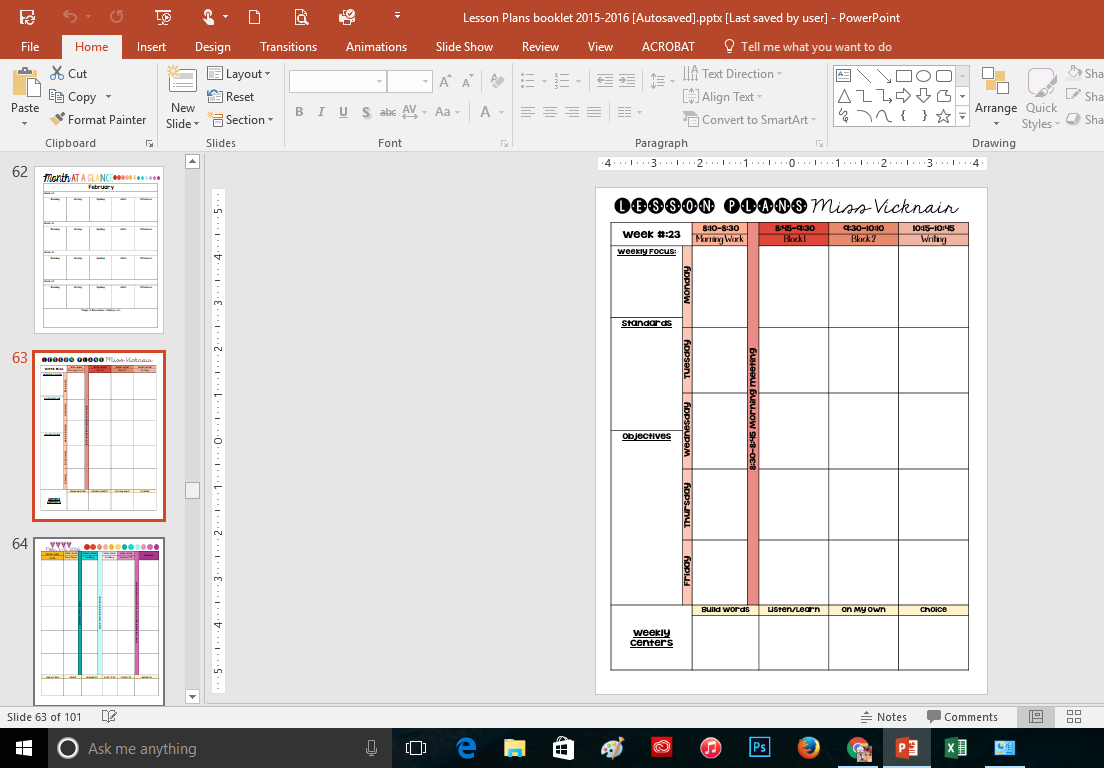
I just inserted a table and made the boxes fit my needs. I added my name and the date. Then I created Month at a Glance pages, months, and then duplicated enough pages to stretch my entire year. The file came to 101 pages, 2 page spread per week. 

I also included some blank pages in the back for faculty meeting notes and next year ideas.

And then I printed out the entire file, two sided. Ran it through my binding machine, and bound it for the year. 

Speaking of binding machines, mine is awesome! I got it at Office Depot. It's a Swingline Pro Click.

You can buy the spines and precut paper, too, if you don't want to invest in the machine. 

This little machine is perfect for how I use it. I've bound a lot of things!
So after I've printed and bound my planner for the year, I'm ready!


I take the blank planner book with me to grade level meetings with my team for planning. I write plans in pencil. 


Not pretty, I know. 

Then later on I type up my written plans in the blank template I made in PowerPoint. It really doesn't take long and I suppose I could just keep the penciled plans and use them, but it's not pretty!! And there are no pictures! 

Print them out and all that's left is to glue them on top of the penciled plans for prettiness. 


And that's it. Easy peasy. 
Now you have a chance to win this for yourself! A bound, personalized hard copy and the digital template! 

Enter the rafflecopter here: 


Winner will be chosen March 11.

Don't want to wait? 

You can buy the file here, complete with instructions and pictures on how to make it your own. It's on sale this week for half off! 

Thanks for reading!

Five for Friday! {March 4, 2016}

Hey guys! Happy Friday!

I had a very busy week so I'm excited to be linking up with Doodle Bugs Teaching for Five for Friday!


My week started on Saturday when I presented at West Baton Rouge Parish Schools Mini LaCUE conference. I presented on creating HyperDocs using Google Docs. You can check out the presentation and work through a first grade HyperDoc {HERE}. 

The best part? I got to hang out and catch up with my friend over at Pelicans and Pipsqueaks, Kristi! 
She rocked her presentation on QR Codes!


I also got to play a game of Breakout Edu which was a lot of fun! A room full of adults trying to unlock 5 different locks whilst rummaging through a librarians stash of seemingly unsuspecting loot. 
We eventually solved it (after 44 minutes!) and discovered the culprit behind the missing eBooks on MackinVia. I can see its uses in a middle school or high school classroom in regards to technology. I was trying to think how my 26 first graders would do when told to go look through a pile of stuff for clues. I will definitely have to read up more on this activity!


I got another project posted on Donors Choose! I'm asking for 10 tablets to complete my collection in the classroom. If I get this one funded, I will have 1:1 in my room! I'm so excited about the possibilities! 


It was Read Across America Week! I made shirts for my first grade team. 
Don't we look great? 
You can read about how I made them and grab a template {HERE}. 


The kids loved making all things Seuss this week. My favorite? 
Jennifer's Directed Drawing of the famous cat from First Grade Blue Skies. 

They are just fabulous little budding artists!


And that's all for this week! Have a great weekend!

Celebrate Reading Week! A T-Shirt Freebie!

Hi y'all! I hope this Monday was fab for you! Today I posted this pic on Instagram and had some questions so I thought I'd share the template I used!

Since this week is Read Across America week, I made these shirts for my fellow team members in first grade. 

It was so simple and took about 1 hour of my life to design and make all 4. Add in an additional 20 minutes for shopping for the supplies and this was the quickest project I've done in awhile11


First, I bought this
Avery Dark Fabric Transfers
Found it in the crafts section near the fabric. I also know it can be found near the office supplies with the labels.

I got this pack of 5 sheets for about $10 at my local Walmart. You can find it HERE on Amazon for $8.99. 

Then I headed over to the men's department at Walmart (because the women's shirts are too fitted!) and searched for some red short sleeve tees. Bought 4 Fruit of the Loom tees for a STEAL at $4.72 each. 
Red Short Sleeve T-Shirt
Then I just designed the pic in PowerPoint. There is this new awesome feature in PPT 2016 called Draw. It means you can draw. 

On the slides. 

Directly. 

Yeah-free form and all that jazz. I'm really excited for it!! 

Draw in PowerPoint
This was done just using my finger-yeah, my last name got a little sloppy but I was so excited!!

From there I just printed out the designs onto the Avery transfers-BEST THING ABOUT THE DARK FABRIC TRANSFERS-------

You do not need to flip the image before printing!! 

Just print. Trim. Peel the backing. Lay on shirt, top with the included tissue paper. Iron on the shirt. 

Presto-manifesto, you've got a simple homemade Seuss inspired shirt for the birthday celebrations Wednesday!


Sound like something you would like to do? 

Click {HERE} for the template designs. I've made slides for Teachers 1-10. 
Teacher 1, 2, 3, 4, 5, 6, ,7 8, 9, 10

Thanks for reading! 

Google Certification

Hi friends! I know it's been a little while since my last post but you know, life happens!! I do hope everyone has had a fabulous year so far!

I wanted to talk today a little about my journey to become a Google Certified Educator.

Have you heard about this? It's fabulous. I have learned so much about tools that are available to teachers and students to help make learning more accessible and easier!

And, best of all, it's FREE. 

Yep, Google is so awesome that it's offering PD to teachers that they can complete in the comfort of their own home at their own leisure. And it's unbelievably helpful. Go {HERE} to read all about it, but this is the gist: 

There are Google Apps for Education (GAFE) which include Docs, Sheets, Slides, Drawings, and many others. These are free Cloud Computing apps that anyone can use. Google Training is simply helping educators to learn how to better incorporate these tools into the classroom. 

There are four types of training: 
Certified Educator Level 1 - basics
Certified Educator Level 2 - advanced
Devices Training - Chromebooks, tablets, mobile devices 
Trainer Training - become a trainer to other educators

To get started, all you need is a free Google Account. That's it. So go and sign up.

Then log into the Training Center and start your training.  

The lessons are pretty straight forward. They start with a title, an introduction, overview of tools used, and end with a lesson check.


The lessons vary per unit. Some have two or three lessons, some have more. 
The first unit, Get Ready to Use Technology in the Classroom has four lessons that you work through. 

Google walks you through step by step. 

 They usually have videos or examples of other educators explaining how they use Google tools in the classroom. The training also gives scenarios and an opportunity for you to jot down your ideas. 


At the end of each unit, you complete a lesson check. And Google lets you know if you have it correct or not with a Check Answer button. 

After you complete the unit, you take a Unit Review test. This involves some multiple choice and short answer questions, along with some performance tasks. 
 You can take the test as many times as needed. You can also review any lessons at any time. Google records your answers and progress for you. When you are finished working through all 13 units, you can choose to take the test to become certified. It's only $10. 

Sorry! I can't help you out there :(
You have to agree to not disclose anything on the test when you take it. I can tell you that its a mix of multiple choice and performance tasks. You have 180 minutes to complete the test. You use Google Chrome and you must have a working webcam because they take random pics to make sure you are you. 

When you pass (and if you have completed the training you will!) you receive a badge to place on your profile or resume and a certificate to proclaim your expertise!
The certification is good for two years when you must re-certify. 

And that's it! It really is amazingly simple to complete! After Level 1, move onto Level 2! The training and test is exactly like Level 1, but the final test is $25 this time. 

After you've taken and passed both exams, celebrate and move forward with taking your classroom and school google! 

If you are an accredited school, you can get Google Apps for Education (GAFE) for FREE. Yep, free. Google wants to put technology into schools hands as easily as is possible. You get unlimited accounts for your school and unlimited storage in Drive. UNLIMITED. All you need is a domain. I purchased one for my school for $12 from eNom. 


They will walk you through it all - though I do suggest you have somewhat of a knowledge of technology to set up a domain and administration of a GAFE account. I would highly suggest you recommend it to your district tech team, though. Google opens a world of possibilities for you school, district, classroom, and professional life. 

Please let me know if you have any questions about Google Certification or any questions about possible uses in the classroom. 

Thanks for reading!

Five for Friday! {December 4, 2015}

Hi friends! It's Five for Friday time again with Doodle Bugs Teaching! It's been a really busy week and I think it will not slow down until AFTER the new year! I absolutely love this time of year. Everything everywhere is designed to fill your heart with love and kindness. I hope you are feeling it, too!

Let's get started! 
 This week our elf in the classroom showed up! After reading the book, the kids got to choose a name for him. We had quite the selection, but in the end they voted on Chippy.
This one was my favorite! Darth Elf!

And he has been quite naughty. The kids love him and they are so excited to come in everyday and look for him.

The other day he changed all of our screens. 

My classroom door is also elf themed! 


It's finally December!! It's my favorite month! 

I wait all year and it's here. The city is always decorated with tinsel, wreaths, and lights. There are events practically everyday, and everybody sends out Christmas Cards!! I will more than likely not be doing the last thing there because I caught the flu last week and it was not a good time to take pics. 

What is everybody's favorite thing about the Holidays??


And, sadly, my student teacher had her last day this week. I am going to be so lost without her. She has helped to make this year fabulous and the kids are going to miss her so much! They wrote her farewell letters and I bound them into a book. I also gave her a lifetime license to my TpT store and a jump drive with some various freebies from my blog. 


Carly Summer has the opportunity to attend the Model United Nations conference right here in Baton Rouge. At this event, high school kids from around the state come together to discuss diplomacy, international relations, current events, and learn about the UN directly. 

She has to dress professionally and speak publicly. I am so impressed by her school. They are giving so many great educational opportunities for these kiddos. 


FINALLY OUR DISNEY MAGIC BANDS CAME IN!!! 
This means it's real. It's actually happening in 22 days. 


Yay!!! It's so exciting. 


Well that's it for now!! See ya real soon!